Indian Railways has revolutionized train ticket booking by introducing voice-activated booking through its advanced AI-powered virtual assistant, AskDISHA 2.0. This feature aims to make the ticket booking process easier, faster, and more accessible for millions of passengers across India.The National Mineral Development Corporation (NMDC), a prestigious ‘Navratna’ Public Sector Enterprise under the Ministry of Steel, Government of India, has announced a significant recruitment drive for the years 2025-2026. This initiative aims to fill 995 trainee positions across various technical and non-technical disciplines at its mining complexes in Kirandul and Bacheli (Chhattisgarh), and Donimalai (Karnataka). With the application window now open, this presents a substantial opportunity for individuals seeking a secure and rewarding career in the public sector, contributing to India’s vital mineral extraction industry. The recruitment drive, detailed in Employment Notification No. 03/2025, offers diverse roles ranging from Field Attendants to specialized HEM Operators and Maintenance Assistants, catering to a wide range of qualifications from 8th pass to Diploma and B.Sc. All interested and eligible candidates are encouraged to apply online through the official NMDC
What is AskDISHA 2.0?
AskDISHA 2.0 (Digital Interaction to Seek Help Anytime) is an Artificial Intelligence (AI) and Machine Learning (ML) based virtual assistant, powered by CoRover.ai. It was launched by the Indian Railway Catering and Tourism Corporation (IRCTC) to simplify passenger interactions and services.
Initially introduced as a chatbot for queries, AskDISHA has been significantly upgraded to its 2.0 version, enabling end-to-end ticket booking and other functionalities through voice commands and conversational interactions.
Key Features of Voice-Activated Booking with AskDISHA 2.0:
- Multilingual Support: AskDISHA 2.0 supports voice commands in multiple languages, including English, Hindi, Hinglish, and Gujarati. This makes it highly accessible for a diverse user base, including those who may not be comfortable with typing or text-based navigation.
- Password-Free Booking: One of the most significant advantages is the ability to book tickets without needing to remember your IRCTC password. The system allows secure booking through OTP (One-Time Password) authentication sent to your registered mobile number, simplifying the login process.
- Guided Booking Experience: The AI assistant guides users through every step of the booking process, making it intuitive even for individuals with limited technological experience.
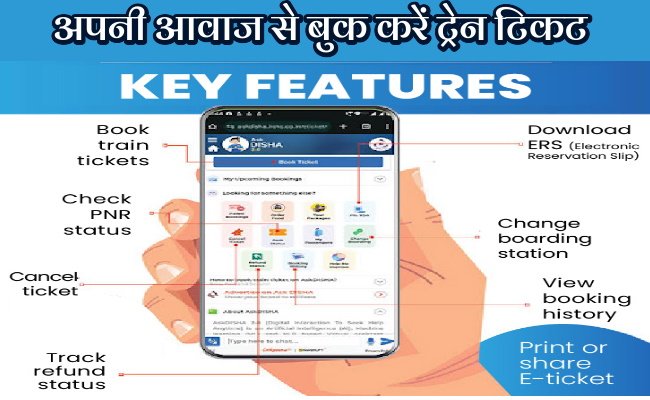
Comprehensive Services: Beyond just booking, AskDISHA 2.0 also enables users to:
- Check PNR status.
- Check refund status for cancelled tickets or failed transactions.
- Cancel tickets with ease.
- Change boarding stations.
- View booking history.
- Download, print, or share e-tickets (ERS).
- Get answers to various train-related queries.
- Faster Refunds & Transaction Retries: The system promises quicker processing of refunds for cancellations or failed transactions. It also allows users to retry failed payments within a 15-minute window, minimizing disruptions.
- Saved Passenger Details: For frequent travelers, AskDISHA 2.0 can store passenger details, allowing for quicker future bookings by avoiding repetitive data entry.
- Tatkal Booking Support: The AI feature also supports Tatkal ticket bookings, which are often time-sensitive.
- Multi-Channel Access: AskDISHA 2.0 is available on both the IRCTC official website and the IRCTC Rail Connect mobile app.
How to Book Train Tickets Using Voice Commands (Step-by-Step):
The process of booking a train ticket with AskDISHA 2.0 using voice commands is straightforward:
Access AskDISHA 2.0:
- On the IRCTC Website: Visit- www.irctc.co.in. Look for the AskDISHA 2.0 icon (usually a chat bubble or virtual assistant icon) typically located at the bottom right corner of the homepage. Click on it.
- On the IRCTC Rail Connect Mobile App: Open the app and locate the AskDISHA 2.0 icon.
Initiate Conversation:
- Once AskDISHA 2.0 is open, you can start the interaction by typing a phrase like “Hello” or “Book Ticket,” or by clicking on the microphone icon and speaking your command.
Provide Travel Details via Voice:
- The assistant will prompt you for necessary travel information. Use your voice to provide the details:
- “Book a ticket from [Source Station Name] to [Destination Station Name].” (e.g., “Book a ticket from Bhopal to Delhi.”)
- “On [Travel Date].” (e.g., “On June 15th.”)
- “For [Class Preference].” (e.g., “For 3AC,” or “Sleeper class.”)
Select Train and Confirm Details:
- AskDISHA 2.0 will display a list of available trains, their timings, and seat availability based on your voice input.
- You can then verbally select your preferred train, class, and seat (if applicable).
- The assistant will verify the details with you.
Secure Payment and OTP Authentication:
- AskDISHA 2.0 will guide you through a secure payment process.
- It typically involves OTP-based authentication to log in and proceed with the booking. You will receive an OTP on your registered mobile number, which you’ll need to input or verify as instructed.
- You can also make payments using conversational voice commands with UPI (integrated with CoRover’s BharatGPT), where you can verbally confirm the transaction after being prompted.
Receive E-ticket:
After successful payment and verification, your e-ticket will be generated. You will receive an SMS confirmation, and you can download or view the e-ticket through AskDISHA 2.0 or your IRCTC account.
Why Voice-Activated Booking is a Game-Changer:
- Convenience: Book tickets anytime, anywhere, with just your voice.
- Accessibility: Especially beneficial for users who find typing on small screens difficult, or those with visual impairments. The multilingual support further enhances accessibility.
- Speed: Reduces the time spent navigating menus and filling forms, leading to faster booking.
- User-Friendly: Simplifies a potentially complex process, making it intuitive even for less tech-savvy individuals.
- Security: OTP-based authentication ensures secure transactions without relying on remembering complex passwords.
About the Author